The army community has witnessed several hundreds of armies come and go over the years. With many people curious about how exactly one can create a new army in this era, Club Penguin Armies decided to put together a comprehensive guide on creating armies.

Designed by Gabi
It is worth mentioning that this guide will be divided into two parts. The first part deals with the initial stage of creating an army, until the point where you register it. The second part will address the things you need to do after registering your army.
Part One
Build A Network

The Water Ninjas maxing 8? Nope, just a group of friends changing the weather in their Water Ninja suits
Choosing Colleagues
You need to decide whether to build your army by yourself, or with “co-creators“. Before making this decision, try to understand how much work goes into setting up a new community. Having more than one creator might help you lighten the workload if you do not have enough time or experience to properly match the required efforts. Moreover, you will have someone to bounce ideas off of, someone to help build your brand and your identity.
However, co-creator is an important role in the army. You must make sure that the person you choose for this position is trustworthy enough. They must also have at least some amount of experience that proves useful to you, otherwise they will just act as deadweights in the rise of your new army. You must also have proper conversations with them to ensure that you share the same vision. This helps to avoid potential disagreements in the future that could create internal drama. It might be more prudent to hire candidates as moderators or high command members if you do not trust them yet. Hiring someone who secretly intends to bring your army down is the quickest way to lead your precious creation into a deface.
Planning Stages
Most new armies never make it past this stage. After all, it’s not that easy to create a relatable branding that will attract new members. The first step should be having a proper name for it. Moreover, this can change over time as you receive feedback from your staff and members. However, creating an army that has no name will drastically reduce your chances of getting new members – and even of being taken seriously by the community.
If you have no idea how to call your army, it might help to define what goals. Apart from the typical hunger to become a major powerhouse, there are certain other details that matter. What do you want your army’s community to feel like? Are you going for a family-like vibe that makes your troops feel as if they found an online home? Are you going for a highly competitive environment that attracts gamers and passionate individuals? For example, it is not the best idea to call your army “Evil Gangsters” when you intend to uphold the rules of Club Penguin and have a mild nature.
You also need to build a professional-looking Discord server that will make your members feel comfortable. The server must have the following list of necessary channels:
- Announcements – a place to send updates regarding the army
- About – a brief guide for new troops to understand what your Discord server is about
- Club Penguin Army Battleground (CPAB) Guide – a channel that provides step by step details on creating an account on the CPPS where most armies host their events and battles
- Rules
- Event Information – this is where you can announce your events
- Event Attendance – this is where your troops can claim their event perks
- General Chat
- Event Pics – to document the events that you organize on any Club Penguin server, most importantly how many people showed up.
- Bot Commands
- Miscellaneous (Art, Food, Pets, Music, Homework Help, Memes, Discord Games, etc)
- Staff Channels
Once your Discord server’s skeleton is ready, you need roles that represent the ranking system in your army. New armies usually have fewer members, so it might be useful to create a ranking system that allows members to quickly gain experience and become staff. The roles should also match your army’s theme, and the Discord colors usually reflect your uniform’s primary colors.
As you gain experienced staff members, you can train them to help you out with the day-to-day responsibilities. This is the quickest way of ensuring your army grows. However, it is also important to do background checks on potential staff members before hiring them. It’s best to avoid getting mired in scandals that arise from hiring someone with a controversial past. Keep in mind, that anyone who has special permissions in your server would be able to severely damage it, even if they are not an administrator. A lot of new armies fell victims to server defacements early on.
The final step is to create a uniform. An army’s uniform should be visible during battles, but not scare new recruits away. It also makes sense to try and match your army’s name with your uniform. An army called “Red Bandits” cannot sport a blue uniform without getting several concerned looks. After you created the uniform and maybe hosted your first event, you can reach out to @gtsa aka Superhero, CPA Battleground’s owner, to request for your army’s command to be created. Whenever your new member needs to acquire the uniform, it can simply be done with one command that gives you all the items, as well as the army’s tag. Thanks to the commands you can also easily check how many of your troops are online, using !size [army’s name] or !sizeroom [army’s name].
Once you have completed all of these planning stages, you can move on to the next step.
Officialising Your Army
You need three things to properly officialise your army. The first, and the most important part, is an event picture that shows an event held by you with at least you and another penguin online, wearing the uniform. Multilogging is a surefire way of getting your army banned. Whilst it is not required, it is desirable to have a website. Armies almost always use WordPress to create theirs, as its dashboard is very blogger friendly. This even allows people who have no idea about running websites to write event posts and other fun articles for your army!
You can create custom graphics for your website and even your Discord server using Photoshop or Illustrator if you are a skilled graphic designer. However, Canva is also an easy way of creating generic graphics that still look good. Freeware like Paint.net and Gimp are pocket-friendly alternatives to Adobe subscriptions. With the proper plugins, you can basically achieve the same results as Photoshop in Paint.net. However, the design process will be much more painful and long.
In order to make a strong first impression, it is important to host an opening event that maxes well. There are several armies that love supporting new ones. You can reach out to the leaders and request for an alliance – your allies can help you get started! However, it is important to be courteous while forging alliances. Unnecessarily antagonizing army leaders will certainly result in wars, you should also remember to not only take but to give as well. Moreover, overly relying on your allies will not work out for you in the long term, as they have their own army to look out for first and foremost. To gain the community’s respect, you should put more emphasis on recruiting than allies attending your events. Allies are also are not able to attend the tournaments for you as well as most wars.
The proper format for officialising your army in the Club Penguin Armies league is pinned in the #opening-events channel. Here’s the format for your reference, and an example of a successful registration:
Army Name:
Leaders:
Website (if applicable):
Discord:
Picture of event:
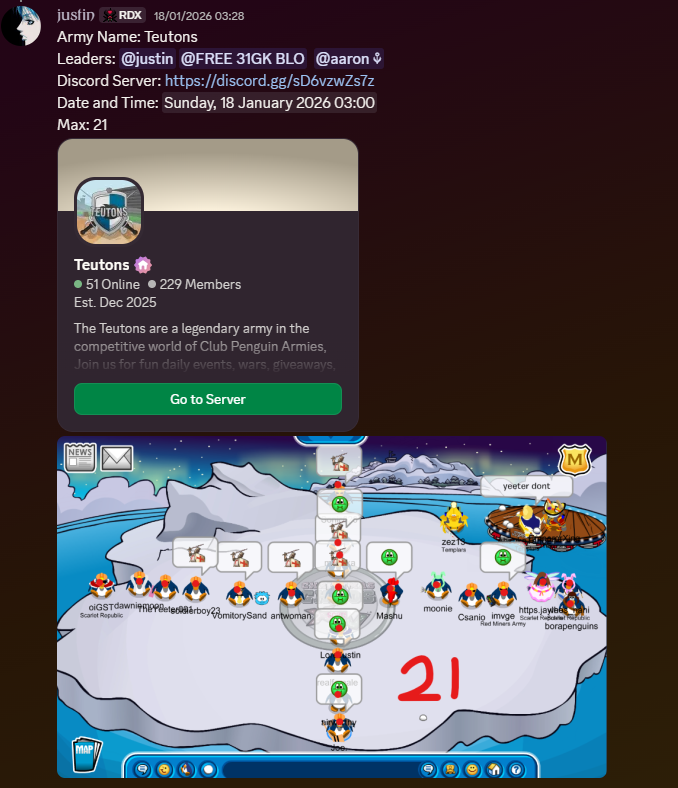
Once you post your request that meets the requirements, one of the admins will approach you and ask you for further details in order to create your army’s role in the server. After your army has been made official, you will be able to participate in the league’s activities, such as the map, tournaments, or other army activities.
Part Two
The second part of this guide will address the things you need to do after officially establishing your army.
Website and Server Graphics
Creating a website, as mentioned in the previous post, is quite easy. WordPress provides free hosting options for it’s users, with tons of modern themes at your disposal. However, creating a website that sticks to the Digg3 theme followed by most armies will require help from an experienced website owner. You could request one of your allies to help you out. You could also start paying for website domain hosting, but it isn’t absolutely necessary.
Hiring a designer to create graphics for your website helps your army look more professional. There are lots of designers who make graphics for free. However, most designers who charge for their work have good reason to do so. Most armies usually get lucky at some point and end up recruiting a designer into their ranks. You could create a Designers role in your server that provides some sort of perks for the people willing to make graphics for your army. Remember to credit the artists who work for you! Most armies use custom graphics in their server banners, server icons, information channels, bot embeds and of course, in emotes. Some also make some for their event channels or event schedules. Club Penguin Armies usually asks new armies to submit an emote that we can include in our league server.
Ranks and Promotions
Before you start hosting events, there are some setups tasks that need to be completed. The ranks of your army will play a vital role. Creating a smaller ranking system allows the members to quickly ease into the staff team. This might seem desirable in the beginning, since you need as many staff members as you can get. However, in the long run, this can create overpopulation in the important ranks. This will make it tougher to promote new, more active people. Lack of promotions in your ranks might cause dissatisfaction among the team.

An example of a small ranks system
Changing the rank system too much might end up reducing the value of the ranks. Your troops might start feeling that they work hard to get higher ranks just for it to get changed, putting their hard work to waste. An alternative to this could be having a large number of ranks. You can using recruiting as an incentive for troops who want to get promoted quicker. Moreover, you can offer double or triple promotions for very important events, like tournament battles. This might help bring in lots of new recruits for your army. At the same time, it allows active members to quickly join the staff ranks, while keeping unsuitable people at bay. People who are immature and unable to handle responsibility should not be entrusted with staff responsibilities.
Most armies handle their troop promotions manually. However, armies with experienced bot developers in their ranks often design a custom army specific bot that handles the entire economy, as well as promotions. While this might seem like a cool thing to do, bot developers often get unmoderated access to your Discord servers with their creations. It is recommended to ensure that you can trust the developer before hiring them to build a new bot. With that being said, it is easier to promote troops with the help of your staff team while the army is still new. This also helps you stay in touch with your community and keep an eye on promising new recruits. You can also use some form of economy system where you award virtual currency to troops for attending events. Once they acquire a certain amount, they get promoted.

An example of armies handing out currency and promotions
Discord Bots And Moderation
A good army usually employs a huge roster of Discord bots to add more features to its server. Some of these, like the bots used for moderation, are necessary for your server. Most general purpose bots provide all the basic functions you will ever need. It is up to you to test the various bots available on the public forums and use one of them. Some of them are MEE6, Carl-Bot, YAGPDB, Nadeko, UnbelievaBoat, Vortex, Invite Tracker, FredBoat, Giveaway Bot, etc. You can use one or more of those bots to implement auto-moderation in your server. Auto-mod constantly checks messages for inappropriate words or phrases and deletes them with the option to punish the sender.

Carl bot’s automod dashboard
Managing The Staff Team
Most armies do not use an actual system for staff promotions. Instead, the leaders handpick the staff members for promotions based on their contributions. This is because it is tough to implement a system that properly translates staff work into numbers. Leaders are often far better judges for this process. Moreover, some staff members might be overly active and meet the physical requirements for a promotion. However, their personality might make them unsuitable for this role. People who are under 15 (between 13 to 15), constantly trolling, insulting others, trash talking the army, etc., are not suitable for staff promotions. You should not let massive activity, contributions and loyalty blind you from their obvious shortcomings. Instead of a promotion, find some other way to reward such people that properly appreciates their contributions.
As mentioned in the first post, every army should have a goal. As a leader, it is your task to plan exactly how you can achieve your dreams. Furthermore, conveying and discussing your plans with your staff members helps them understand what you expect from them. You can set weekly goals, recruiting minimums and staff activity guidelines to help your staff team optimally assist you in making your army better.
Event Schedule
For the first month or two, you can continue experimenting with event timings on various days. However, sticking to an event schedule is a much better way. A perfect schedule utilizes the best possible timings throughout the week, while keeping your community in mind. You can find out your staff and troops’ preferred timing by carrying out a poll. Event schedules also help your army hit its best possible max. Moreover, it might encourage some of your loyal soldiers to keep their schedule free for the events.

An example of a weekly event schedule
However, announcing events in advance will reduce your flexibility in timings. This makes it difficult to host events if something unpredictable happens in the future, forcing you to cancel. Cancelling events too often will create a bad image of your army. A schedule could also allow your enemies to know when they can raid you during wartime. Apart from event schedules and posting individual event information in a channel, you can also use a bot to provide a countdown whenever someone requests it. In the end, it is up to you to weigh the pros and the cons and decide what works best for your needs.

A sample event information channel that allows troops to RSVP for events

Example of a countdown bot
Submitting Events
Once you register the army and start hosting events, you are required to submit these events every week. Club Penguin Armies posts a Top Ten Armies list every Sunday. The Top Ten Committee analyses your events in the past week to create a score. This score is then used to rank the armies. You can submit all the events that you hosted in a particular week in the #event-results channel. You should submit your weekly events in a single message, which makes it easier for the staff to collect the event data. However, keep in mind that the deadline to submit events is Saturday. While it is not compulsory, it is recommended to record your event results through your website’s blog posts. Not only does this look more professional, but it also creates a huge event archive that you can scroll back through for reference.
There are a few rules that you should know when submitting events:
- Include a picture of the highest max you achieved. Only penguins in one room will be counted!
- Remember to include the information about whether an event was a battle. A battle will give you more points for the score, especially if it’s against a major army.
- Include the event’s time zone. The time between 3am-10:00am EST belongs to the AUSIA time zone, and gives a slight boost to your max. If you max 15 penguins in AUSIA and in EU/US time zones, the former one will give you a few more points.
- Don’t forget to submit at least one good picture of your army doing tactics each week. This screenshot will then be included in the Top Ten post.
- Don’t hide events, or you may face punishment. Once you pinged your server for an event on Club Penguin and didn’t cancel it before the starting time, the event will count for Top Ten, whether you like it or not.

How to submit event results
Diplomacy And Battles
Allies are one of the most important parts of the community. They can help you in your events, make the server more active and support you during wars. However, keep in mind that most army leaders expect something in return for their friendship. When asking for an alliance, you should be polite and respectful. Don’t act arrogant in front of the others. Try to avoid unnecessarily antagonizing other armies. You can also reach out to army leaders and ask them for a practice battle. Practice battles help you prepare for the real deal, and add a fun twist to your usual events. You can also teach your staff members to lead battles during practices, which makes it easier to fight in tournaments and wars.
This is where the guide ends! Club Penguin Armies wishes you our best for your army creator career.
Written by Mchappy in June 2023 – Updated by JojoTeri April 5, 2026